
How to Register and Upgrade Your OVO Account

Ruangngoprek.web.id – How to Register and Upgrade the Latest OVO Account. You probably already know what the OVO app is. OVO is a service application that can be used for secure online payments and transactions. It can also be called a digital wallet, e-money, or electronic money. So, how do you register and upgrade the OVO app? Registering an OVO account is very easy. You just need to install the OVO app on your smartphone, and the app will automatically offer you the option to register.
Nowadays, many payment methods use digital wallet services, a real example is the Pre-Employment Card Program. When you register for the Pre-Employment Card program recently issued by the government, you are required to have an online payment service such as the OVO, Gopay, Linkaja, etc. applications. So by using online payment services, you will get many benefits.
How to Register and Upgrade the Latest OVO Account
By using OVO services, you can easily transact online, you can buy credit, data packages, electricity tokens and much more that you can do for online transactions using the OVO application. To register for the OVO application, please follow the steps below.
1. Download and install the OVO application for Android on the PlayStore, for iPhone on the AppStore.
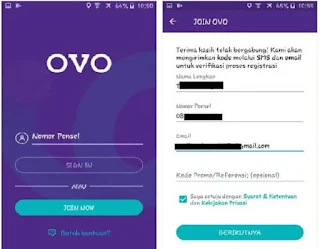
2. Once completed, please open the OVO application. Then the registration options will appear, swipe the screen display to the left until you find the last image and then click " START ".

4. Then you will be sent a 4-digit OTP code via SMS, enter the code in the column provided by the OVO application.


6. Finally, you will be asked to create a PIN, which will become your password when logging into the OVO app. This code is confidential, so don't let anyone know it. Please enter the PIN. Then, re-enter the PIN you just entered.

7. After entering the security code, your OVO account is ready to use, and you are registered as an OVO member.
How to Upgrade to OVO Premier
To maximize the use of the OVO app, you are required to upgrade your OVO account to OVO Premier. This way, you can enjoy more features and benefits of the full OVO service, such as:


How to Register and Upgrade the Latest OVO Account
By using OVO services, you can easily transact online, you can buy credit, data packages, electricity tokens and much more that you can do for online transactions using the OVO application. To register for the OVO application, please follow the steps below.
1. Download and install the OVO application for Android on the PlayStore, for iPhone on the AppStore.
2. Once completed, please open the OVO application. Then the registration options will appear, swipe the screen display to the left until you find the last image and then click " START ".

3. Next, click “ JOIN NOW ” to register, then fill in the required data.
- Full Name : Fill in according to the name on your ID card
- Mobile Number : Fill in the mobile number that you will register with the OVO application.
- E mail : Fill in your active email address
- Promo/Referral Code : Enter the promo code you registered with (if you don't have one, leave it blank). Then, check the box next to "I agree to the Terms & Conditions and Privacy Policy." Then, click " NEXT ."


5. The next step will be an email verification code, which will be sent directly to your email. Please open your email and click the " Verify Email " button or enter the 4-digit verification code sent to your email.


How to Upgrade to OVO Premier
To maximize the use of the OVO app, you are required to upgrade your OVO account to OVO Premier. This way, you can enjoy more features and benefits of the full OVO service, such as:
- Send money easily : You can transfer your balance to all local bank accounts in Indonesia.
- Balance limit increase : If previously your balance top-up was limited to only 2 million, then by upgrading your OVO account to Premier, your balance top-up can reach 10 million.
- Get lots of OVO investment opportunities : You'll get safe investment opportunities from the OVO Club. And much more.
How to Upgrade Your OVO Account to Premier
1. Prepare your ID card, then log in to your OVO account. You'll see a warning to upgrade to OVO Premier. Simply click " Upgrade to OVO Premier ," as shown in the image below.

2. After that, there will be a request to complete data such as a photo of your ID card, then enter your biological mother's name, and a selfie photo holding your ID card, then click confirm.

3. Finally, check the terms and conditions. Your request to upgrade to OVO Premier will be processed immediately. Please allow 24 hours for your data to be verified.
4. If the OVO upgrade verification process to Premier has been approved, there will be a notification via email, as shown in the image below.

That concludes our brief overview of how to register and upgrade your OVO account to the latest Premier account. This tutorial is specifically for those of you who are still unsure about registering for the OVO app.

Post a Comment for "How to Register and Upgrade Your OVO Account"