
Download Canon Service Tool V5306

Ruangngoprek.web.id – Download the Canon Service Tool V5306 resetter for free. Many of you may need the latest Canon Service Tool reset software. This Canon Service Tool V5306 software is extremely useful because you can use it to repair Canon printer errors caused by a full ink disposal pad. This causes the printer to blink.
If a Canon printer is blinking (the printer indicator light is flashing), it will no longer be able to print. The only way to reset the printer is to use the Canon service tool or by disassembling the printer and replacing the damaged EPROM IC with a new one.
An easy way to reset a blinking Canon printer is to use the Canon Service Tool V5306 reset software. You don't have to disassemble the printer; simply connect it to your computer using a USB cable and run the Canon Service Tool V5306 software. For more details, please see the steps below.
How to Reset a Canon Printer Using the Canon Service Tool V5306 Software:
- First, the printer is turned off, press and hold the resume button, then press the power button but do not release the resume button.
- Next, release the resume button and press it five times, then release it along with the power button, then the printer will enter " Service Mode ".
- To enter Service Mode, each Canon printer has a different technique. You can search for it on the internet according to the type of Canon printer you want to reset.
- Download Service Tool V5306, extract it, and then run it. If a virus is detected, temporarily disable your computer's antivirus. (Don't worry, this tool isn't a virus.)
- Prepare several sheets of paper on the printer's paper backing, during the reset process the printer will print a resetter log report document.
- Then on the “ Absorber (Main) ” line, click “ Set ”. The printer will then print one sheet of the document. When the confirmation window appears, click “ OK ”. Then click “ Set ” again on the second line “ Absorber (Main) .
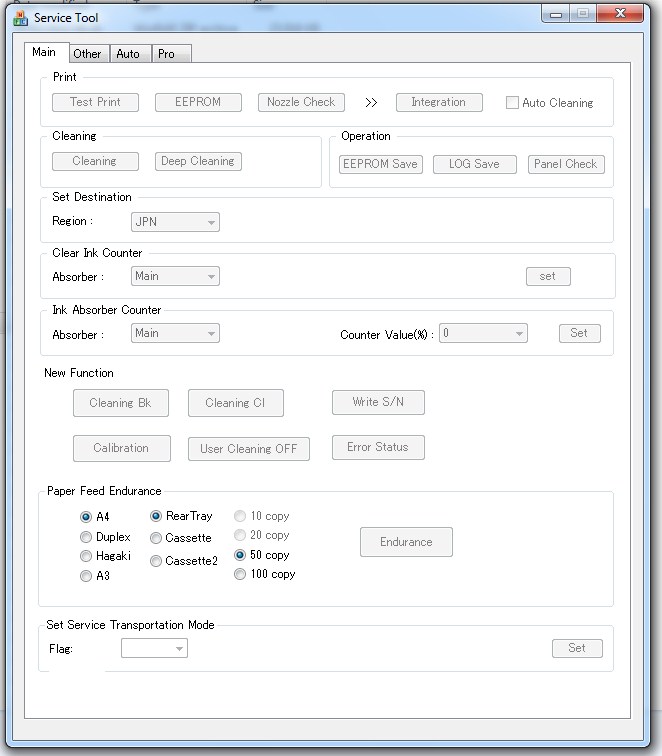
- Next, click " EEPROM ." The printer will then print one sheet of the document. When the confirmation window appears, click " OK ."
- Once done, turn off the printer and turn it on again.
Download Resetter Canon Service Tool V5306
- App Name : Canon Service Tool
- File Size : 1.2 MB
- Supported OS : Windows XP, 7, 8, 8.1, 10 (32 bit/64 bit)

So, if any of you have failed to use the Canon service tool, please try again using the Canon service tool v5306.
Canon Service Tool V5306 Supported Canon Printers:
E-series : E400, E404, E407, E408, E410, E414, E417, E418, E460, E461,E464, E468, E470, E471, E477, E478, E480, E481, E484, E488, E489.
G-series : G1000, G1100, G1200, G1400, G1500, G1800, G2000, G2100, G2200, G2400, G2500, G2600, G2800, G2900, G3000, G3100, G3200, G3400, G3500, G3600, G3800, G3900, G4000, G4100, G4200, G4400, G4500, G4600, G4800, G4900, G4902, G5000.
IB-series : IB4010, IB4020,IB4040, IB4050, IB4060,IB4070, IB4080,IB4090, IB4100, IB4110, IB4120,IB4140, IB4150, IB4160,IB4170, IB4180, IB4190.
MB-series : MB2000, MB2010, MB2020, MB2040, MB2050, MB2060, MB2100, MB2110 MB2120 MB2140 MB2150 MB2160, MB2300, MB2320, MB2340, MB2350, MB2360, MB2390, MB2700, MB2710 MB2720 MB2740 MB2750 MB2760 MB2790, MB5000, MB5010 MB5020 MB5040 MB5050 MB5060 MB5070 MB5080 MB5090, MB5100, MB5110 MB5120 MB5140 MB5150 MB5160 MB5170 MB5180 MB5190, MB5400, MB5410 MB5420 MB5440 MB5450 MB5460 MB5470 MB5480 MB5490.
MG-series : MG2550S, MG2570S, MG2580S, MG3000, MG3010, MG3020, MG3022, MG3040, MG3050, MG3051, MG3052, MG3053, MG3060, MG3070, MG3077, MG3070S, MG3077S, MG3080, MG3090, MG3600, MG3610 MG3620 MG3640 MG3650 MG3660 MG3670 MG3680, MG5500, MG5510, MG5520, MG5540, MG5550, MG5560, MG5570, MG5580, MG5600, MG5610, MG5620, MG5640, MG5650, MG5660, MG5670, MG5680, MG5700, MG5710, MG5720, MG5721, MG5722, MG5740, MG5750, MG5751, MG5752, MG5753, MG5760, MG5765, MG5766, MG5770, MG5780, MG5790, MG5795, MG6700, MG6800, MG6820, MG6821, MG6822, MG6840, MG6850, MG6851, MG6852, MG6853, MG6860, MG6865, MG6866, MG6870, MG6880, MG6890, G6930, MG7700, MG7710, MG7720, MG7740, MG7750, MG7751, MG7752, MG7753, MG7760, MG7765, MG7766, MG7770, MG7780, MG7790, MG5540, MG5640, MG5650, MG5740, MG6840.
MX-series : MX320, MX320, MX328, MX330, MX330, MX338, MX340, MX340, MX347, MX348, MX350, MX350, MX357, MX358, MX470, MX471, MX472, MX474, MX475, MX476, MX477, MX478, MX490, MX491, MX492, MX494, MX495, MX496, MX497, MX498, MX499, MX530, MX531, MX532, MX534, MX535, MX536, MX537, MX538, MX920, MX924.
TS700- TX7XX series : TS3100, TS3110, TS3120, TS3122, TS3129, TS3140, TS3150, TS3151, TS3160, TS3165, TS3166, TS3170, TS3170S, TS3177S, TS3180, TS3190, TS3195, TS5100, TS5110, TS5120, TS5140, TS5150, TS5151, TS5160, TS5170, TS5180, TS6100, TS6110, TS6120, TS6140, TS6150, TS6151, TS6160, TS8100, TS8120, TS8140, TS8150, TS8151, TS8152, TS8160, TS8170, TS8190, TS8195, TS9100, TS9120, TS9140, TS9150, TS9155, TS9160, TS9170.
That's a brief overview of the Canon Service Tool v5306 software and how to reset all Canon printers. Hopefully, this article is helpful, especially for those in need of a Canon resetter program.
Tags: Canon service tool all series, Canon service tool v5306, How to reset Canon All Series, Download the latest Canon version resetter

Post a Comment for "Download Canon Service Tool V5306"