
How to Submit or Register a Blog with Google Search Console

Google Search Console: Definition and Benefits for SEO
What is Google Search Console?
Ruangngoprek.web.id - Google Search Console (GSC) is a free tool provided by Google to help website owners understand and optimize their presence in Google search results. This tool gives site owners direct access to critical data about how their site performs in Google Search, allowing them to track site performance, identify issues, and make necessary improvements to make their site more search engine friendly (SEO).
Ruangngoprek.web.id - Google Search Console (GSC) is a free tool provided by Google to help website owners understand and optimize their presence in Google search results. This tool gives site owners direct access to critical data about how their site performs in Google Search, allowing them to track site performance, identify issues, and make necessary improvements to make their site more search engine friendly (SEO).
Google Search Console Main Functions
Google Search Console provides a variety of useful features and data for website analysis. Some of GSC's main functions are:
1. Site Performance Monitoring
GSC allows website owners to monitor the performance of their pages in Google search results. This includes data on impressions, clicks, average search position, and click-through rate (CTR).
2. Indexation Check
GSC shows the pages indexed by Google. You can check whether a specific page has been indexed, and if not, you can request that Google index it.
3. Technical Problem Report
GSC will notify you if there are any technical issues with your site that could impact performance in search results, such as issues with indexing, AMP errors, or issues with the mobile version of your site.
4. Backlink Monitoring
Google Search Console allows you to check the backlinks pointing to your site. Backlinks are a crucial factor in SEO, and knowing your backlink sources helps you manage your site's backlink profile.
5. Analisis Mobile Usability
GSC checks whether your site is mobile-friendly and reports issues that might affect users accessing the site from mobile devices.
6. Security Check
GSC can identify security issues, such as malware or phishing attacks, that could impact your site. If an issue is found, Google will alert you so you can take immediate action.
Benefits of Google Search Console for SEO
1. Understanding Site Performance in Search Engines
With the data provided by Google Search Console, you can understand how your site performs in search results. This information includes the number of times your site appears in search results, how often users click on your site, and the average position for specific keywords. This data is crucial for optimizing underperforming pages and improving your content strategy.
2. Identify and Fix SEO Issues
One of the main benefits of GSC is its ability to detect issues that could impact SEO. For example, if Google can't index a particular page, or if there's another technical issue, you'll be notified immediately. This allows you to take swift action to fix the problem.
3. Optimizing Keyword Usage
GSC provides data on which keywords are driving traffic to your site. This information helps you identify which keywords need to be improved or utilized more effectively. With the right strategy, you can target relevant keywords to improve your site's ranking in search results.
4. Monitor Site Health
Google Search Console is also extremely useful for monitoring your site's technical health. This includes issues related to user experience, especially on mobile devices, and security concerns. By keeping your site optimized and secure, you can maintain your site's ranking and reputation with both users and search engines.
5. Managing Backlinks
High-quality backlinks are crucial for SEO. With GSC, you can see the sources of backlinks pointing to your site and check whether they're relevant and beneficial to your SEO. Furthermore, if you find any harmful backlinks, you can take appropriate action, such as disavowing them.
6. Increase Indexing Speed
If you make major changes to your site or publish new content, you can use GSC to request Google to re-index those pages. This allows new or updated pages to appear more quickly in search results.
How to Submit or Register a Blog to Google Search Console
Once you have a website or blog, the next step is to register it with Google Search Console. Here are the steps:
1. Go to https://search.google.com/search-console , then copy your site URL and paste it in the space shown in the image below. Then, click Continue .

2. The next step is to click Open Properties .

3. The next step is to go to the Settings section , then in the ownership verification section , click the arrow as shown in the image.

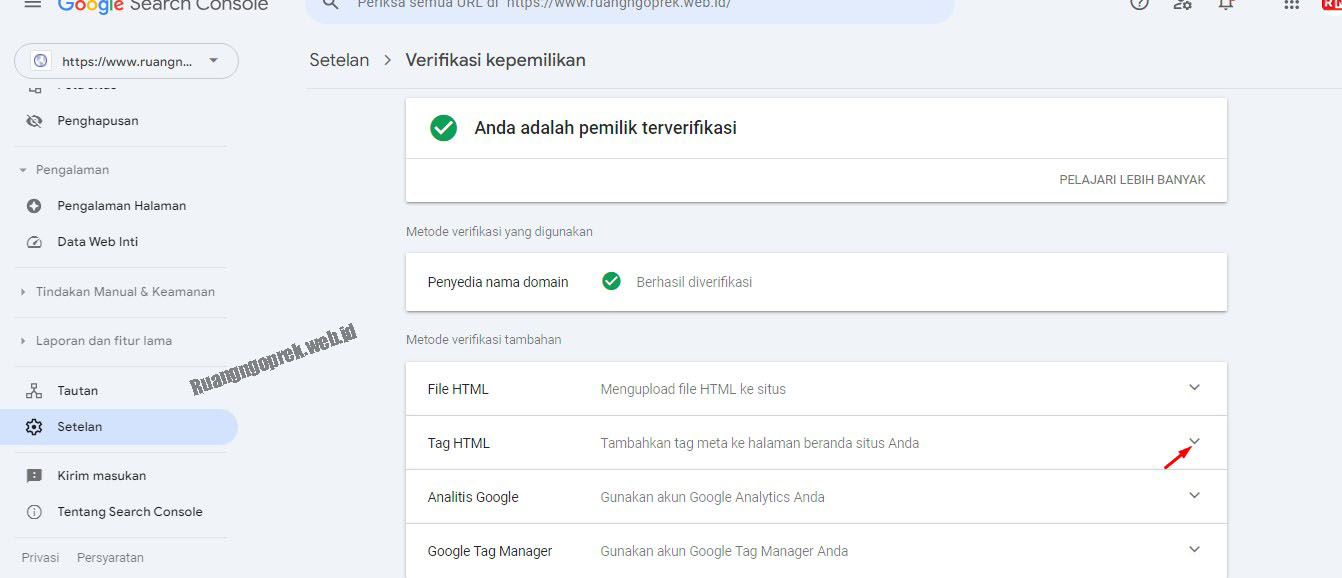
4. The next step is verification, here are several methods to verify your site to Google Search Console , here I use HTML Tag verification, please click the down arrow button as shown in the image.

5. Click Copy Meta verification code, which will then be placed under <head> .

6. Next, go to Blogger.com , then go to the Theme section , then select Edit HTML .

7. Paste the Meta Verification Code that you copied earlier right below <head> , then click save (in the top right corner).

8. Next, click Verify .

9. Still in Google Search Console, go to the Sitemap section, add sitemap.xml , until it becomes https://www.ruangngoprek.web.id/sitemap.xml , then click Submit .

10. Make sure you have at least one published article, so that it will be easier for Google Robots to identify your site.




Conclusion
Google Search Console is a crucial tool for website owners to monitor and optimize their site's presence in Google search results. Using GSC, site owners can understand how their site performs in search results, identify SEO issues, and quickly resolve them. GSC's primary benefit lies in its ability to provide in-depth data and reports that can help improve SEO performance and user experience.
Using Google Search Console regularly is an important step in improving the visibility and quality of your site in the eyes of search engines and users.
Google Search Console is a crucial tool for website owners to monitor and optimize their site's presence in Google search results. Using GSC, site owners can understand how their site performs in search results, identify SEO issues, and quickly resolve them. GSC's primary benefit lies in its ability to provide in-depth data and reports that can help improve SEO performance and user experience.
Using Google Search Console regularly is an important step in improving the visibility and quality of your site in the eyes of search engines and users.

Post a Comment for "How to Submit or Register a Blog with Google Search Console"